How to Embed Video Testimonials on Your Website
Learn how to embed video testimonials on your website: copy the snippet, place it for conversions, and keep pages fast. Step-by-step guide for any site in 2026.
In short
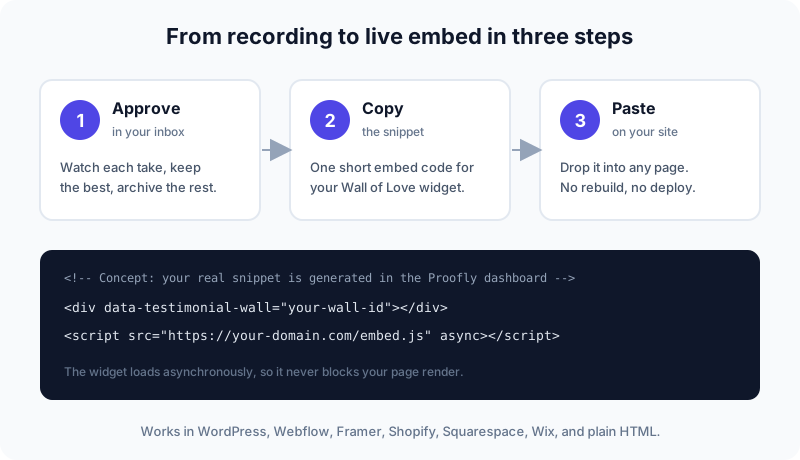
Embedding video testimonials takes three steps: approve the best takes in your inbox, copy the Wall of Love embed snippet, and paste it into any page that accepts custom HTML. Place proof near buying decisions (pricing, product, and landing pages), load it asynchronously so it never slows your site, and skip autoplay with sound.
The short answer#
To embed video testimonials on your website, approve the best takes in your testimonial inbox, copy the generated embed snippet, and paste it into your page wherever it accepts custom HTML. The whole job takes minutes and needs no rebuild or redeploy.
Where you paste it matters as much as how. Put video proof near buying decisions: below the hero, on product and pricing pages, and beside landing page CTAs. Load it asynchronously so it never slows your page. The rest of this guide walks through each step.
Step 1: collect and approve your videos#
You cannot embed what you have not approved. Before touching any code, open your moderation inbox and watch each submitted take. Keep the ones with a clear before-and-after story and a specific result, archive the rambling ones.
Aim for variety across the wall: different customer types, different use cases, different lengths. A wall of five similar-sounding clips converts worse than a wall of three distinct stories. If you are still collecting, our in-browser recording guide shows how to get customers recording with no login and no app install.
Step 2: copy the embed snippet#
Every testimonial platform generates an embed snippet for your wall. In Proofly, open your Wall of Love, choose the carousel or list layout, and copy the snippet. It is a short block of HTML and JavaScript that renders the widget wherever you place it.
The snippet follows a simple pattern: a container element that marks where the wall goes, plus a script that fills it in. Here is the concept (your real snippet is generated in the dashboard with your wall's ID):
<!-- Paste where you want the wall to appear -->
<div data-testimonial-wall="your-wall-id"></div>
<script src="https://your-domain.com/embed.js" async></script>
Two things to check in the snippet. First, the script should load asynchronously (the async attribute), so the widget never blocks your page from rendering. Second, confirm the widget inherits your branding: colors, logo, and layout should match the page it sits on, not advertise the tool that made it.
Step 3: paste it on your site#
Paste the snippet into the page where you want testimonials to appear. Every major builder has a way to accept custom HTML; you just need to find its embed block. In general terms:
- WordPress: add a Custom HTML block in the block editor, or paste into your theme's template where the section belongs.
- Webflow: drop an Embed element onto the canvas and paste the snippet inside.
- Framer: use the Embed component or a code override to place the snippet.
- Shopify: add it to a Custom Liquid section on the relevant template.
- Squarespace and Wix: use the Code or Embed block on the page.
- Plain HTML: paste before the closing body tag, exactly where you want the wall rendered.
Save, publish, and check the page on both desktop and mobile. The most common issue is width: the widget should fill its container, not overflow it. If it looks cramped, give the section more horizontal room rather than shrinking the widget. For the full toolkit around this workflow, see our tools directory.
Where to place video testimonials for maximum impact#
Placement decides whether your wall gets watched or scrolled past. The rule is simple: put proof where the buying decision happens.

The five placements worth your time:
- Below the hero. A visitor who scrolls once should meet a real customer. One strong clip here builds trust before they read a word of copy.
- Product and service pages. Proof next to the thing you sell. Match the testimonial to the page: the onboarding story goes on the onboarding feature page.
- Pricing page. This is the peak of doubt, the moment visitors ask whether it is worth it. A clip that names a concrete result answers that question better than a feature list.
- Landing page, beside the CTA. One face plus one result next to the signup button beats another paragraph of benefits.
- Signup and checkout. A short reassurance clip calms last-minute nerves right before payment.
What not to do: exile testimonials to a dedicated testimonials page nobody visits, or dump twenty clips above the fold where they compete with your headline. This post covers the mechanics; the strategy lives in our companion deep-dive, Where to Embed Your Wall of Love, which maps placements to page types in detail. We also measured the conversion effect directly in Video Testimonials and Landing Page Conversion.
Page speed: keeping embeds fast#
Video embeds have a reputation for slowing pages, and they earn it when done carelessly. A wall that loads five full video players at once will hurt your load time and your rankings. Done right, visitors never notice the cost.
Load asynchronously. The embed script should carry the async attribute so it loads in parallel with your page instead of blocking render. This is the single most important technical detail, and every reputable widget does it by default. Verify it in the snippet before you paste.
Lazy-load below the fold. Testimonials near the bottom of a long page do not need to initialize until the visitor scrolls near them. Native lazy loading on iframes (loading="lazy") or an intersection observer that mounts the widget on scroll keeps initial page weight down.
Show thumbnails, not players. A poster image with a play button costs almost nothing to render. The full player should only load when someone clicks. If your widget loads live players for every clip on page load, that is the first thing to fix.
Never autoplay with sound. Autoplaying video with audio is blocked by browsers anyway, and muted autoplay still burns bandwidth and annoys visitors. Let the click be the visitor's choice.
One wall per page is plenty. Two or three testimonial widgets on the same page multiply every cost above. Pick the strongest placement and commit to it.
Can you embed video testimonials on any website?#
Yes, on any site or builder that accepts custom HTML or JavaScript. WordPress, Webflow, Framer, Shopify, Squarespace, Wix, and hand-coded HTML sites all support pasting an embed snippet into a page.
The only environments that resist embeds are locked-down platforms with no custom code option at all, like some hosted marketplace storefronts or strict no-code templates. If your builder has any kind of HTML, code, or embed block, you are fine. When in doubt, check the builder's docs for custom code support before choosing a testimonial tool.
One more consideration: keep the widget's styling consistent with your site. Mismatched fonts and colors signal a bolted-on afterthought. Set the wall's colors to your brand palette in the dashboard once, and every embed inherits it.
Common embed mistakes#
Embedding before approving. An unmoderated wall will eventually show a lukewarm take on your pricing page. Approve every clip before it goes live, and re-check the wall quarterly.
The testimonial ghetto. A dedicated reviews page linked from the footer gets a fraction of the traffic your pricing page gets. Embed where decisions happen.
Wallpaper of faces. Twelve autoplay-adjacent thumbnails in a grid look impressive and convert poorly. Three to six strong clips, curated for the page, beat a wall of everything you ever collected.
Forgetting mobile. Most of your traffic is on phones. If the wall requires horizontal scrolling or the play buttons are thumb-unfriendly, fix the layout before anything else.
Stale proof. A wall whose newest clip is two years old quietly tells visitors the product peaked two years ago. Refresh the wall whenever a great new take lands in your inbox.
FAQ#
How do I embed video testimonials on my website?#
Approve the videos in your testimonial tool's inbox, copy the generated embed snippet, and paste it into your page's HTML or your builder's embed block. In Proofly this takes three steps and the widget loads asynchronously, so it never blocks your page render.
Can I embed video testimonials on any website builder?#
Yes, on any builder that accepts custom HTML or JavaScript: WordPress, Webflow, Framer, Shopify, Squarespace, Wix, and plain HTML sites all support it. You paste the snippet into an HTML, code, or embed block on the page where you want the wall to appear.
Do embedded video testimonials slow down my website?#
They can if you load full video players for every testimonial at once. Keep them fast by loading the widget asynchronously, lazy-loading below-the-fold embeds, showing thumbnail posters instead of live players, and never autoplaying with sound.
Put your wall live today#
Collect a few takes with a no-login recording link, approve the best in your inbox, and paste the snippet where it counts. Proofly's free Sketch plan covers your first 5 video testimonials, and Studio at $15/mo adds unlimited walls with your branding (or a $197 one-time payment, limited-time deal, instead of a subscription).
Common questions
How do I embed video testimonials on my website?
Approve the videos in your testimonial tool's inbox, copy the generated embed snippet, and paste it into your page's HTML or your builder's embed block. In Proofly this takes three steps and the widget loads asynchronously, so it never blocks your page render.
Can I embed video testimonials on any website builder?
Yes, on any builder that accepts custom HTML or JavaScript: WordPress, Webflow, Framer, Shopify, Squarespace, Wix, and plain HTML sites all support it. You paste the snippet into an HTML, code, or embed block on the page where you want the wall to appear.
Do embedded video testimonials slow down my website?
They can if you load full video players for every testimonial at once. Keep them fast by loading the widget asynchronously, lazy-loading below-the-fold embeds, showing thumbnail posters instead of live players, and never autoplaying with sound.